
As an author registered in our system, you have access to a dashboard that displays all of your current, past and future ARC, Newsletter and Beta Reader orders. From this dashboard you’re able to view the details of past orders, update missing information, and edit the details of future orders. To login (or sign up), just click the Author Login link at the top of the Hidden Gems website. It may also be a good idea to bookmark your dashboard so you can access it anytime directly.
Here’s a look a the author dashboard and how to use it effectively.
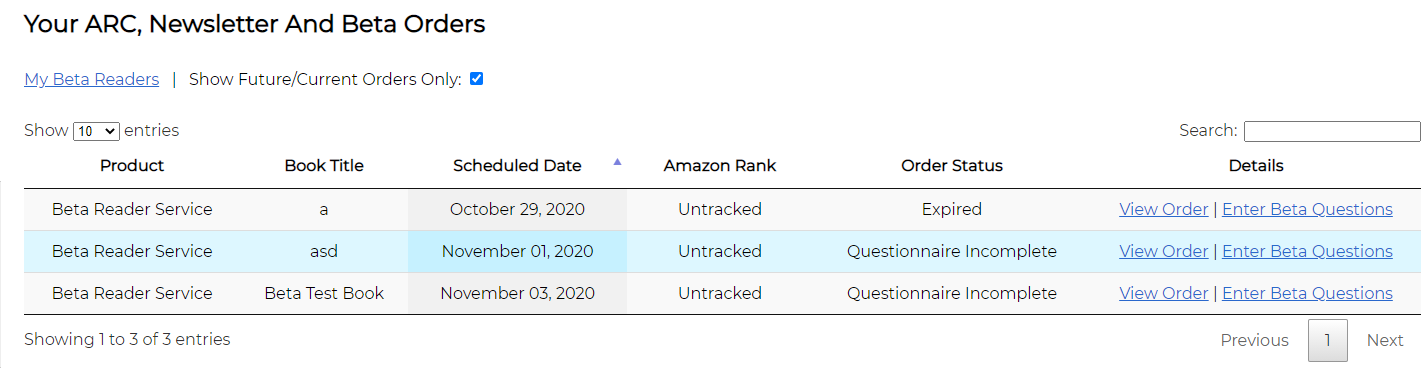
Above the table
My Beta Readers – This link will only show up if you’ve already booked a beta reader order with us and it’s been completed. If you then click this link, you’ll see a list of all of the beta readers (by their beta reader ID) that participated and you can rate each one based on the quality of feedback they gave for your questionnaire. From here you’re also able to block or request specific readers from participating in your future beta reader orders.
Show Future/Current Orders Only – This checkbox is selected by default, which means it will only show your orders that are not yet complete. To see past orders as well, unselect this box.
Orders table
This table shows all of your ARC, Newsletter or Beta Reader Service orders with the following columns:
- Product – The type of product ordered (ARC, Newsletter, Beta Reader)
- Book Title – The title of the book scheduled for this order
- Scheduled Date – The date this order is/was scheduled for
- Amazon Rank – Used to automatically track the Amazon rank of your published Newsletter or ARC books
- Order Status – The status of this order (Beta Reader order statuses listed below)
- Questionnaire Incomplete – Your future order requires you to complete and submit your questionnaire
- Scheduled – Your book is scheduled for the future and your questionnaire is complete and submitted
- Running – Your service is currently underway
- Results Available – All the questionnaire answers are available and can be viewed
- Completed – Your order has been marked complete
- Details – This column contains links depending on the status of your Beta Reader order
- View Order/Edit Order – Use this to view your old order details or edit your upcoming ones
- Enter Beta Questions/Edit Submitted Questionnaire – Add or edit questions to your questionnaire for an upcoming order
- View Questionnaire – View your questionnaire for an order that is no longer editable
- View Results – Click to download your questionnaire answers in excel format (these are also emailed to you)