
In order to improve our ARC program to make it even more accessible to readers and authors, we’ve been working on a variety of improvements. The biggest catalyst for these changes is to support the ability to leave reviews on sites other than just Amazon, which is something that both our readers and authors have been asking for.
While Amazon is the biggest retailer and most authors want reviews there, many also want reviews elsewhere, such as Goodreads, Bookbub, Barnes and Noble, Apple, Kobo and Google. And due to Amazon’s strict review requirements and tendency to make life difficult for reviewers from time to time, many readers can’t leave Amazon reviews at all.
Therefore, we have been working hard to add support for readers leaving reviews on non-Amazon sites for authors that are interested in those (which will always be up to the author). The important thing is that authors can choose where they want reviews, and readers will be able to sign up for books where they are able to review.
To support all this, we had to make some big changes to the back end and thus it was a good time to also implement some other changes we’ve been wanting to make for a long time – all of which are designed to improve the program overall in a number of ways. But due to the scope of all these changes, we’re going to roll them out in phases so that we can tackle any issues or bugs that come up quickly (and there will inevitably be some, hopefully all minor) and keep things running smoothly even as we transition.
Here is a summary of some of the biggest changes coming, separated into 2 sections. Coming soon and coming a bit later. Coming soon means that these are the changes you’ll be seeing very soon, as in the next few days and weeks. Coming a bit later is the next big phase that we hope will follow within a couple of months.
Coming Soon (Oct/Nov 2022)
ARC Reader Accounts/Logins
In order for us to be able to provide all of the additional features and functionality we have planned securely, we need to create accounts and institute logins for all users.
While we know that many other websites already require logins, it truly is something we’ve always tried to avoid here because we know it can be a hassle to have to log in to every site you visit. In order to implement all of the changes coming securely, though, it has finally become necessary. Still, we have endeavored to make the process as painless as possible by creating passwordless url based logins for all existing users that you can use right away, but that you can also convert into a more traditional password based login at any time (which we do recommend).
How this will work is that when we roll out this first phase (mid-October 2022), all existing ARC readers will automatically have an account created and be sent an email with the passwordless URL link you can use to get logged in. When you get this email, please click that link as soon as you can just in case you have any issues. If it works, you’ll see a message that it was successful and you’re done for now – nothing else will change to how you use our program until the next phase rolls out (hopefully within the next couple of weeks). If you don’t see that message, please contact us.
You will also have the option to create a more traditional password if you would rather do that, which is something we definitely recommend. The passwordless url link will work for those that prefer to use that, and unless you clear your browser cookies or logout, it should keep you logged in – but if anyone else had that url they would also be able to login as you, which is why it is better and more secure if you create a password and use that instead.
New ARC readers will automatically have an account created and get logged in via the passwordless login.
Note – If you have a passwordless url login and delete or lose your email and get logged out, but still do not wish to create a password, you can request that a new url be sent to you. But remember that this new url will replace your old one. That means that if you try to use the previous url we sent before, it will no longer work.
How To Login or Know If You’re Logged In
If you get logged out and still have your original email we sent with your URL login, you can click that again to log back in (assuming you never created a password instead). If you can’t find the email with that link, or if you had previously created a password based login, then you can login by clicking the LOGIN link found in the header bar at the very top right of the Hidden Gems website, regardless of which page you’re on.

From that login page, you can request a new login link be sent to you via the “Request Unique Link Login” button, or you can sign in with your email address and password, if you had previously set that up. If you forgot your password, you can request to reset it by clicking the “Lost/Create Password” link on the login page. If you are clicking either of those buttons or links, just make sure you have entered your email address in first, and that it is the email address you use with Hidden Gems.
If you are already logged in, then that LOGIN link in the header bar will instead change to a DASHBOARD link. By clicking that, you will be taken to your ARC Dashboard.

Vastly improved Dashboard
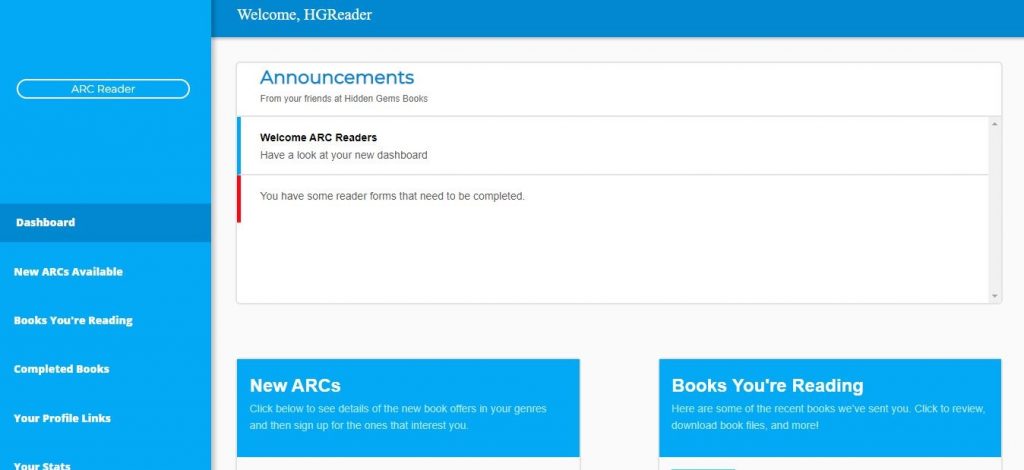
With all the new options that will be available and the fact that there are so many issues with email deliverability, the new system will really center around your dashboard which means it was time to give it a big overhaul. We’ll still send out a daily email about new ARCs (although you will be able to turn that off, if desired), but it will be a lot shorter and have fewer details aside from covers, genres, titles and authors. The rest of the details will be available on your dashboard which you’ll be taken directly to if you click on any of the books in the email. From there you can view all of the other details (blurb, word count, etc) and sign up for any books that interest you. Anyone that doesn’t have at least 1 genre that matches one of the available books will not get the email that day (which is how things worked before), however those that do have at least 1 matching genre will see the same email as everyone else that gets the email that day. That is, the email will show all the covers of the books available that day, not just the ones in your genre – but don’t worry, your dashboard will still only show your genres of interest if you click through to it to sign up for one.
Why are we changing this?
Well, aside from improving on email deliverability issues (these shorter ones will be less likely to end up in spam/junk/promo folders), it was also a necessary change in order to deal with the added complexity of how some books will only be for some storefronts and thus only available to people that can review there, etc. Yes, it does mean 1 extra click to open your dashboard (previously you would just click directly in the email to sign up for a given book, now you click first to go to your dashboard to see the full details, and then click to sign up.) But from your dashboard you can then sign up for all the books you’re interested in just as before. You don’t even have to wait for the daily email, you can always just bookmark your dashboard (which we highly recommend anyway – and if you bookmarked your current old dashboard, that bookmark should continue to work even after we switch over) and then visit it daily and sign up for whatever you want.
Improved Mobile UI
When you’re dealing with books and covers and descriptions and leaving reviews, etc, the more screen real estate you have, the better. For that reason, a website like this will ALWAYS look better and be easier to use on a desktop. But that being said, we designed this new UI with mobile in mind, and did our best to make the mobile experience as similar to the desktop as possible, and to work properly whether you’re on a phone or a tablet.
Download/request the files from your dashboard
With the added security that logins bring, you’ll now be able to download or request your book files directly from your dashboard without having to get another email with the links sent to you first. That’s assuming you don’t want us to send them to your kindle directly…
We can now send ePUBs directly to your kindle!
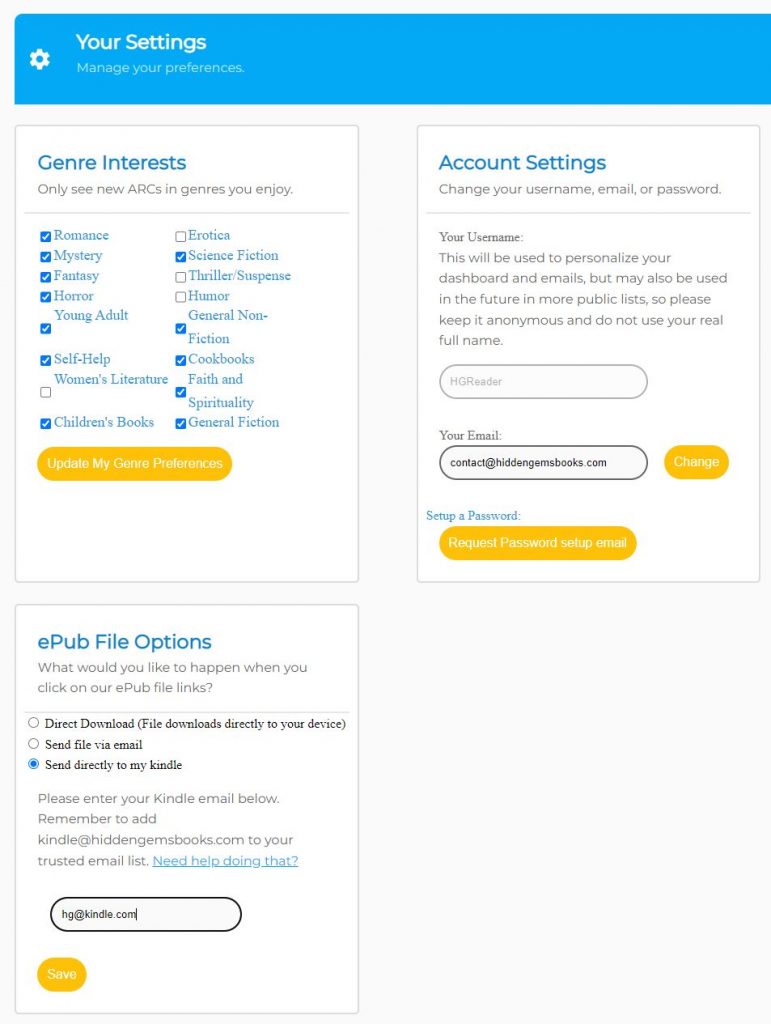
We’re excited to offer this as it is something that has often been asked for. If you choose to select this option and set it up via the settings page on your dashboard (you would need to enter in your @kindle email address and add our kindle email to your Amazon settings as an approved sender), then whenever you click the ePUB link for the books you’re selected to read, we will be able to send them to your kindle directly.
Review Site Setup
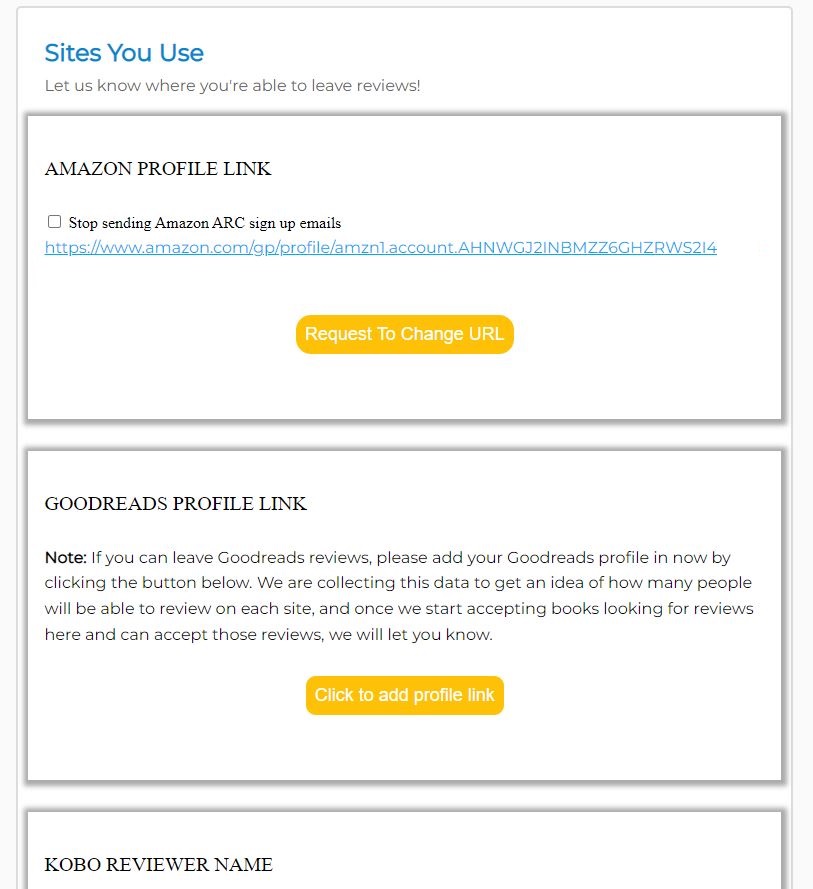
In anticipation of being able to accept reviews on other sites, the first step is capturing who can and is interested in reviewing where. To that end, you will be able to set up all the review sites you want to participate in from your dashboard. Once we have that info, we’ll be able to start asking authors to indicate which sites they want reviews on, and then we’ll be able to move full steam ahead. But first we need to get an idea of who can review where, which is why filling this out will be an essential first step.
Better organization of your ARCs
In the past, once you filled out a reader form the book generally disappeared from view as a way to keep your book list from being cluttered, and most of the info was removed. The new dashboard uses tabs to organize your ARCs into lists of those open for sign up, those you’re still reading, and those you’ve completed. If you’ve left a review, you can even click to view that review on Amazon. For those of you that have read 10s or even 100s of books, there are sorting and search options available as well.
Self-Management
Aside from being able to set up your profile links for your review sites and the stuff you could do before like modify your genres, you can now do other things from your dashboard settings such as change your email address or password, setup a username to personalize your dashboard and emails, and more.
Coming A Bit Later
Once all of the above is rolled out and stable, and enough of you have filled out your review site profile info to indicate the other places you’d be interested in leaving reviews, we will roll out the final set of changes (for now). Here are some of the things we have planned.
Non-Amazon Reviews
Obviously this is the main feature and the catalyst for most of these changes. Authors that sign up for our ARC service will be able to select which review sites they are interested in, and then readers that can review on those sites will be allowed to sign up for those books. All sign ups will still be voluntary, although we may end up only having certain numbers of slots available per site so the more sites you can review on, the more offers you’ll see and the more chance you’ll have of being selected. We anticipate that Amazon will still be the primary site that most authors will want reviews on though, so those that can review on Amazon will likely see the most offers and be sent the most books.
Stats overhaul
Right now your stats (which can still be found on the new dashboard) are based around the fact that we only had 1 review site. Once we have multiple review sites, we will want/need to expand on these stats so we can break it down in more interesting ways (mainly for those that review on more than 1 site).
Leaderboards
One fun thing we’d like to implement is the tracking of various stats and put them into leaderboards. By adding a username to your settings page, we’ll be able to do that and keep things anonymous. We would never display anyone’s email or real name (we aren’t capturing your real names anyway – unless that was what you chose to put as your username – which we don’t recommend). This probably will come later, beyond when most of the above comes out.
Other stuff?
We have some other ideas that are too soon to talk about, but if there are features or things you’d like to see us implement, please let us know either by email (contact@hiddengemsbooks.com) or by using the contact us form.
What if there are issues or bugs?
Unfortunately, I can almost guarantee you that there will be some issues and bugs, especially soon after rollout. We’re a pretty small team over here, and you’re a very large group of readers and authors. As much as we’ve tried to anticipate all scenarios and test everything, I have no doubt that some of you will discover things that don’t quite work as they should. If you do, please don’t get upset – our goal is to fix those as soon as possible but we have to know about them, first! So please send us an email (contact@hiddengemsbooks.com) with the issue, including a screenshot if possible and any steps you took that may be useful in us reproducing it. And it would be very helpful to also include what sort of device you were using when it happened. With all that info, we’ll be able to get it fixed up ASAP.
When Does This All Happen?
You should have already gotten an email about the first phase (logins) which we expect will be rolled out this weekend (Oct 7-9). You’ll know it happened because you’ll get an email with your new url login link which you should click on right away (and then sign up for a password instead, if you’re so inclined). If you didn’t get our email about these changes or don’t get an email this weekend with the new url, check your spam or junk folders, or Gmails promo tab, as sometimes our emails end up in there. If you do find any of our emails in those spots, drag them back to your inbox to teach your email program to put them there regularly. And regardless of whether you got those emails, that doesn’t mean future ones won’t get lost, which is why we highly recommend adding us to your contact list and/or safe sender list, and even whitelisting us.
Thanks everyone, we’re looking forward to all of the exciting changes we have in store and hopefully you are as well.
The Hidden Gems Team