
For enhanced security/privacy and to allow us to do more with your dashboard, all ARC readers now must login to use the system.
In order to make it easy and not break your flow of reading books, when you first sign up for the Hidden Gems ARC program you will be automatically logged in (after you verify your email) and you should stay logged in unless you explicitly log out. Just click on the Dashboard link at the top right of our website to get started!
For enhanced security and easier log in/out, users can create a more standard password at any time which we highly recommend.
However, there are still some login issues that users may experience depending on the type of login method they use, so please see the list below to identify your issue and the solution.
I haven’t set a password and want to login again
If you are still using the unique link login that you were assigned originally and you have logged out of your dashboard, then you need to click that link to log back in. The link can be found in the original welcome email we sent you, or if you requested a new one since then, in the email that was sent with the new link.
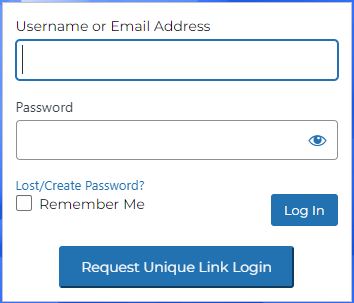
If you don’t have any old emails with your links, you can go to the login page of the website and add your email to the Username or Email Address box, and then click the “Request Unique Link Login” button. Once you do that, you will be sent an email with a new unique login you can click to access your dashboard. Remember that if you logout though, you will need to use that link to login again so do not delete the email. Or even better, click the Lost/Create Password link instead and create a password that you will remember and can use to login in the future instead of the links. Passwords are more secure, so we recommend everyone create one when possible.
IMPORTANT NOTE: Whenever you generate a new unique link (as described above) it invalidates your previous links so make sure to only use the latest link we sent you. And only click the button once, otherwise you will have 2 new ones generated and it may be confusing about which one to use.
I created a password but I can’t remember it
Once you’ve created a password your old unique link URLs can no longer be used, so you must remember the password that you set. It is case sensitive, so you have to enter it exactly as you did when you first set it.
If you cannot remember it, you can reset it by clicking the Lost/Create Password link (see screenshot above) from the login page. You will then be prompted to enter your email address and click the “Get New Password” button.
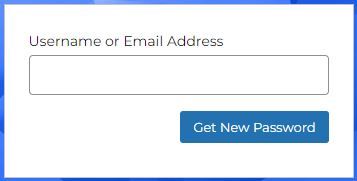
Make sure to only click this button only ONCE, as each time you do it will send an email to you with a reset password link and each time it generates that link, it invalidates the old one. So if you click it multiple times, you will get more than one email and link and not know which one to use.
Click the link to reset your password and you will be taken to a screen that lets you add a new password. By default, a random strong password will be generated for you that you can use, however if you wish to create your own, just click into the “New password” field and replace the password that is there. You can also click the “Generate Password” button to create a new strong password.
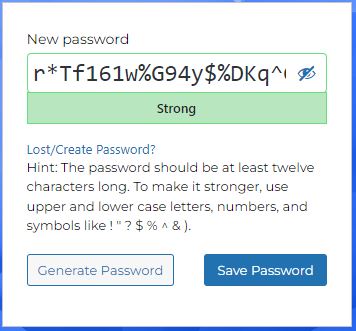
The strength of your password will be displayed under the “New password” field. If your password is considered weak/very weak (i.e. easy for someone to guess) but you still want to use it, you must click the “Confirm use of weak password” checkbox first before you will be able to save your new password. It is recommended you use a variety of symbols, letters and numbers to create a strong password, and not reuse a password you use on other websites.
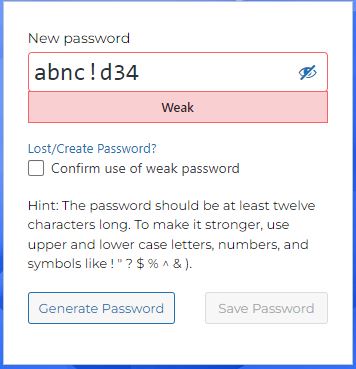
Once you are happy with your password, click the “Save Password” button and make sure to remember what you’ve chosen and that passwords are case sensitive. You can now login with your new password.
The password reset link doesn’t work
If you follow the steps above to reset your email, but when you click the link in your email you get a message that the link is invalid, it is usually because you have requested the link more than once and you are trying to use one of the links that has since been invalidated by a later request. Note that the emails with these links can sometimes get delayed, although they should usually arrive within a few minutes. If there is a delay and you click it twice (or more), often you’ll get the first email before you get the second one and because you have requested the second one, the first link is now invalid.
Please wait at least 30 minutes for the email to come before giving up and trying it again. Usually it will come well before that. If not, check your spam or junk folders, or Gmails promo tab. They could be getting lost.
The website says that I’m blocked
If you attempt to login with the wrong password too many times, the website will determine that you may be a hacker and thus lock you out of the site temporarily. If you find that you are blocked or locked out, you can either wait for 24 hours until the block is lifted automatically, or send us an email and we can unblock you sooner.
To avoid this, make sure to be careful about entering your password and consider saving it with your browser username and password save capability.
Still having login issues?
If you are experiencing a different issue with login, or the solutions above don’t work, please contact us.
If you follow the steps above to reset your email, but when you click the link in your email you get a message that the link is invalid, it is usually because you have requested the link more than once and you are trying to use one of the links that has since been invalidated by a later request. Note that the emails with these links can sometimes get delayed, although they should usually arrive within a few minutes. If there is a delay and you click it twice (or more), often you’ll get the first email before you get the second one and because you have requested the second one, the first link is now invalid.
Please wait at least 30 minutes for the email to come before giving up and trying it again. Usually it will come well before that. If not, check your spam or junk folders, or Gmails promo tab. They could be getting lost.
The website says that I’m blocked
If you attempt to login with the wrong password too many times, the website will determine that you may be a hacker and thus lock you out of the site temporarily. If you find that you are blocked or locked out, you can either wait for 24 hours until the block is lifted automatically, or send us an email and we can unblock you sooner.
To avoid this, make sure to be careful about entering your password and consider saving it with your browser username and password save capability.
Still having login issues?
If you are experiencing a different issue with login, or the solutions above don’t work, please contact us.