
Your ARC reader Dashboard is your key to reserving new free ARCs, keeping track of the books you’ve been sent, downloading book files, filling out reader forms, managing your account, and much more. We highly recommend bookmarking your dashboard and visiting it daily so that you never miss a great new book.
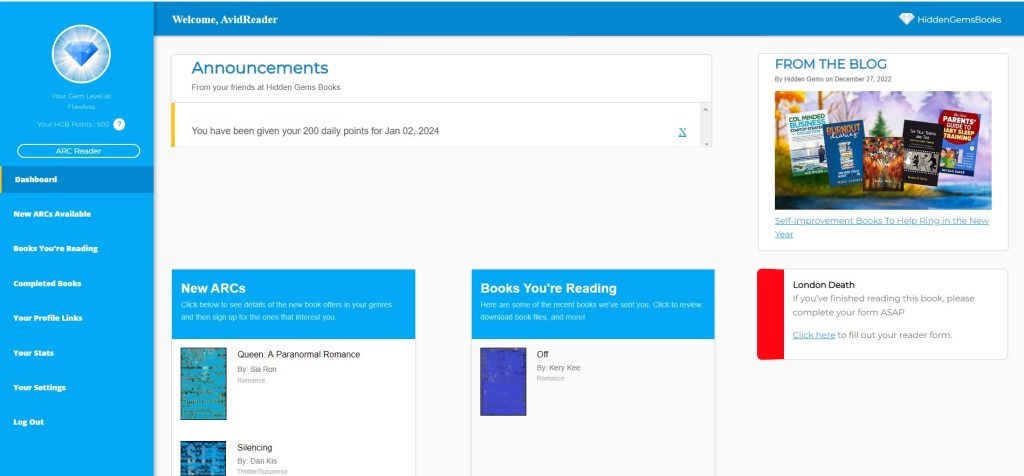
In order to keep things organized, your dashboard is divided into tabs (in the view above, the tabs are in blue along the left side of the page but depending on the size of your screen or the device you’re using, your view may look different or the tabs may be accessed via a menu). Below is a list of each tab and a brief overview of what they are used for, with links to go to more details about each where applicable.
Dashboard (Default tab and common dashboard elements)
When you first login to Hidden Gems, you’ll see your default dashboard tab which is mainly an overview of all the important things you need to know. You’ll see a few of the new ARCs available, some of the books you’re currently reading, important announcements, review reminders, and even a link to our most recent blog or books that may be on sale in one of your genres of interest. Clicking on books in those small New ARCs and Books You’re Reading applets will take you directly to that book in the full version of those tabs – but remember that those small versions only show a few of the selections that may be available on the full tab.
You can also view your username along the top (which will be your email address until you change it) as well as your current gem status and available HGB points (on the left).
New ARCs Available
The New ARCs Available tab displays a list of all of the ARCs currently open for sign up within your genres of interest. Remember that the small version of this tab on the default dashboard tab (in the screenshot above titled “New ARCs”) is not the entire list, that applet only shows you a few of the available titles so make sure to click the full tab to see the complete list of books. From the New ARCs Available tab, you can view all of the book details and reserve a copy of the books that you want to read and review.
Books You’re Reading
The Books You’re Reading tab is where you’ll find a list of all of the books we’ve sent you that you have not yet filled out the reader form for (that is, you haven’t submitted either your review link or reason for not reviewing). From this tab you’ll see some of the details of these books, find the links to leave your review(s) if you haven’t already done so, let us know if your reviews are live for us to find, or provide your reason for not reviewing if you aren’t going to be reviewing at all, as well as leave your optional comment. You can also get the book files directly from here, if you don’t already have them, provided that they are still available.
Completed Books
The Completed Books tab is where you can find all of the books we’ve sent where you’ve already completed your reader form. From here, you can view the review(s) you’ve submitted (if you sent any in), view or edit the reason for not reviewing field if you filled that in instead, or even add a review for a book you previously left a reason for (if you eventually were able to review it after all – always better late than never!) You can also view the comments you left, or add some if you didn’t already do so (although they are optional).
Your Profile Links
The Your Profile Links tab is where you go to add your profile links for all of the review sites that you can leave reviews on. Until you fill out the profile link for at least one review site, you won’t see any ARCs but as soon as you do, the available books will be displayed in your New ARCs Available tab immediately. The more review sites you can review on, the more selection you’ll have so fill out as many as you can. You only need to fill the info out for each particular review site once, and we have more detailed instructions here if needed. The sites we’re currently accepting are Amazon, Goodreads, Kobo, Barnes & Noble, Bookbub, Apple Books and Google Play Books. If you have any questions or issues with any of it, please let us know and we can help get you set up.
Your Stats
The Your Stats tab is where you can find more details about your Gem level and what it gives you, how many books you’ve read, reviews you’ve left, etc.
Your Settings
The Your Settings tab is where you can setup your username, your file preferences (such as having us send the books directly to your kindle), your email preferences, your genre interests, change your password, and more.
Referral Bonus
The Referral Bonus tab is where you sign up for or manage the Hidden Gems ARC reader/reviewer referral program. This program encourages you to spread the word about our ARC program to fellow reader/reviewers like yourself, and if they sign up and participate with your referral link, you can earn money!
Log Out
Click Log Out if you wish to log out of your dashboard, although unless you are using a public computer or sharing it with someone you don’t trust, we recommend you stay logged in.