
One of the biggest issues readers have with our service is that they aren’t getting all of our emails, so they miss book sign ups or worse – they sign up for a book but then miss the email telling them they were chosen and sending them the links. Reasons for this vary, but the most common is overly aggressive email spam filtering that ends up hiding our emails simply because they come from a mailing list, ignoring the fact that subscribers have signed up for these emails explicitly.
Your dashboard can be used to combat this issue, but you still have to remember to visit it regularly. So to help with that, we’ve introduced a new notification feature that sends your computer or device alerts about sign ups, book sends or review reminders. This service uses Google’s Firebase Cloud Messaging service, so you can be confident that it is both reliable and secure. And once you’ve accepted or declined the notification request, you won’t be asked again on that device unless you reset your browser settings.
Note: Currently, the Firebase Messaging is not supported on iOS devices, although that may change in the future.
To accept the notifications, you must first read a quick message from us about the notifications, and then decide whether to allow or block the notifications in a popup from google. When you see this message, just click Continue.
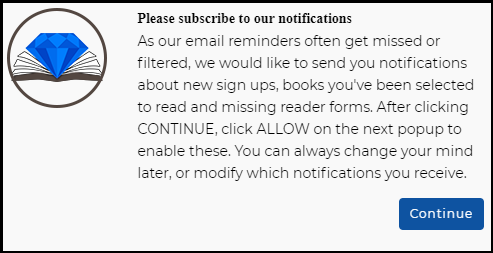
Next, you will get the message from google asking if you want to accept the notifications. Click Allow so that we can send you notifications and remember that even if you allow this now, you can change your mind later and even turn off individual notification types from via your dashboard at any time.
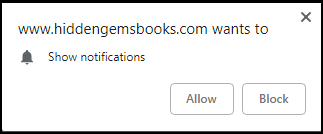
As it is much easier to accept the overall notification setting and then turn off the individual notifications you don’t want later via the dashboard than it is to block the notifications altogether and then later change your mind, we recommend accepting the notifications when asked and then adjusting your preferences after using it for some time.
Either way, you can find instructions on turning the settings off at the browser level or individually via your dashboard right here.