
There are two main reasons why we need the profile info for all the sites a reader can leave reviews on.
First, as authors send out free copies of their books in the hopes of getting reviews (because reviews help sell books), and each author desires their reviews only on specific sites, we need to know where readers can review to be able to send the right offers to the right people. This allows us to not clutter your inbox or dashboard with books that you can’t review even if you wanted to, and only show you ones that are relevant.
The second reason is that, for each book we send you, you’re required to fill out a reader form with either your review link or your reason for not reviewing. To make the process of adding your review links as easy as possible, we do it for you after you simply click a button letting us know they’re ready to be found.
Providing us with your publicly available profile information for the sites you can review on allows us to do all of that. The info for each site only has to be added once, and from that point on we know you can review there and will start displaying all of the free ARC books that want reviews on that site. That means the more review sites you can review on and that you add your profile info for, the more book offers you’ll see.
The profile info we need depends on the review site, usually it is either the link to your profile or your reviewer name from that site. Here is a list of the sites we are currently accepting reviews on, and the public info we’re asking from you.
Note that Hidden Gems does NOT provide any way for anyone, including authors, to tie your review names to your email addresses. Email addresses are never shared with anyone, and the only people that will be able to see your review links will be the author whose book you reviewed.
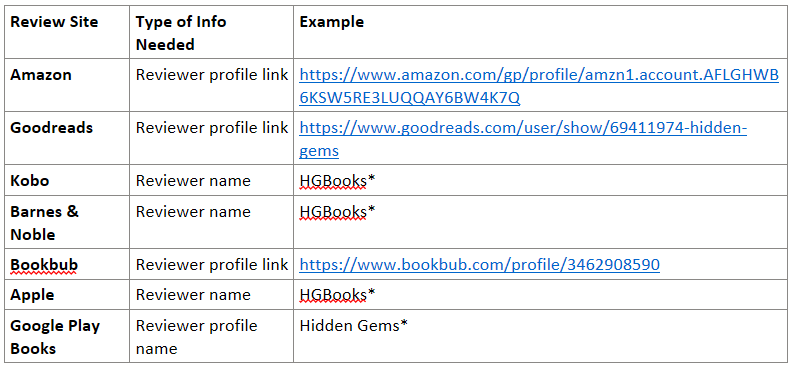
*With the exception of Google, these are the public reviewer names that you entered when you created your account on these review sites, or when you left your review. For Google, it is the name on your Google account. Note that Apple has been removed due to their requirement that books be bought from them in order to leave reviews.
All of this information can be added via the Manage Profile Links link found from the menu at the top left of the app. More information on how exactly to find your own profile link or name can be found here.
Remember that your profile links and names are not secret, so there is no privacy concern in providing us with that information. Anyone that views your public review of a book on any of the sites above can access this information either simply by looking at your review or clicking on your review name to get to your profile page. Those profile pages don’t show any private information either, which is why the sites allow anyone to view them. Generally they are used to see what other reviews you have left.
We use it to find your reviews when you click the “Submit Review” button on your reader form, and then select which site you left your review on. (In the case of Amazon, we also use it to determine what country specific version of Amazon you use, so that we can direct you to the correct site to leave your reviews in the first place.)